React - Lazy loading images, background images, components and modules
Techniques and strategies for lazy loading images, components, and modules in React to improve performance and user experience.

Lazy loading is a great topic nowadays. It allows speeding up loading time and, if carefully architected, it can improve performance of your website/app.
The gist is: defer loading of stuff you don’t need right away, pull it in when it’s needed.
DISCLAIMER:
No code will be shown in this post, we’re only going through some scenarios and investigate solutions.
Recently I worked on increasing TTR (time-to-response) of my website to make it become interactive sooner and gained 20secs.
That’s a lot, but before you jump on your seat I must add that this was benchmarked on slow 3g connection to better quantify the impact of the changes I made.
On a fast connection the same benchmark was around 7secs. Not bad anyway.
My point, before starting, is that lazy loading CAN improve your page speed, but it DEPENDS on many factors. Including your metrics.
First thing is to set the metrics and parameters you want to benchmark, in order to get the right order of magnitude.
In the modern world of web development we like making a big confusion over simple concepts. We also like to throw buzzwords every so often to keep devs awake, or they will live all their lives with keyboard marks on their faces.
We never stop architecting new ways to increase page loading times for many reasons, mainly because we’re running a race against millions of other devs building awesome websites/apps and also because BIG companies like Google like to change the ways they index stuff on the web every turn of the wheel.
Enter the fascinating world of lazy loading! In this world we have lazy components, lazy images, lazy modules, lazy grandpas and lazy girlfriends. Everything is lazy!
How is lazy good though, shouldn’t we want more REACTIVE and FAST things? Forget that, in this world being lazy is good.
Loading an image on the web takes time. Everything we do on the web or on an app that feeds from an external resource is slow (well, SLOWER than picking from memory). Network is slow, servers are slow, reading from a database is slow.
We’ve put so much care into making our website blazing fast (fast loops, reactive programming techniques, a Virtual DOM that only re-renders the important parts of our page and not all of the DOM tree are just some of the examples) and then we rely on loading a slow external image.

This defeats all of that effort right? On top of that add that indexing and SEO will be badly affected by that one image:
Google plans to give slow websites a new badge of shame in Chrome Google is experimenting with a new badge of shame for slow websites. The badge would appear in Chrome, alerting users…
So, brains to the rescue, let’s find a solution. Got it: asynchronicity.
asynchronicity Definition from Wiktionary, the free dictionary
We’ll let our program do something while it’s waiting for something else. Nice, we know how to do this, we’ve been working with async operations since the dawn of programming. We definitely know how to put a big juicy loader (the ‘something’) on a page while everything is ready to be shown.
Then we realise it’s 2019, not the 90'.
Ok well not a loader but what about a skeleton! Skeleton placeholders are cool and quite modern.
Then we realise it’s almost 2020, the React community has rolled out a stable version of Suspense and they’re working on a Concurrent Mode for React. It might be early to use this in production at the time of writing, so what can we do NOW?
What if I could show THE REAL THING while loading instead, what if I could make it near-impossible to spot that something is loading because I started from the resources that are IN VIEW, and I wait until the user moves around to load the rest?
Now, laziness starts to be good!
Here is the flow we want to achieve:
I hit a url or open my app -> I load what is in view -> I scroll down/left/right -> I load more stuff (not talking of infinite scrolling here, that’s another concept) -> I’m happy because I didn’t even see that it was loading
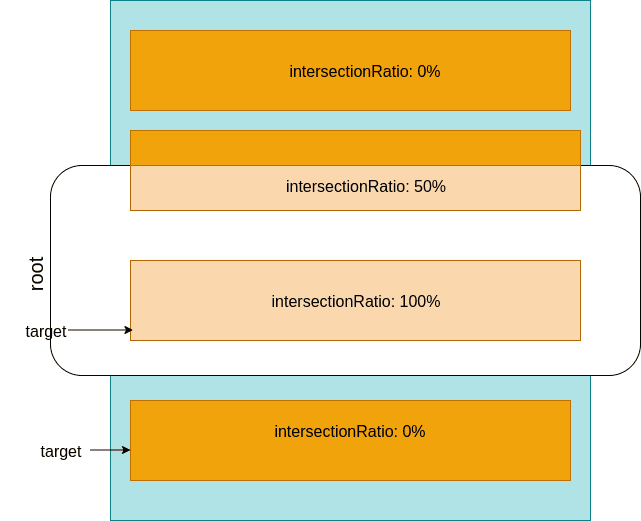
How? Well, this is not a new concept.
Event listeners already interact with scrolling elements in view but performance is really bad. There’s a better way and it’s called like something out of a Star Wars movie…the Intersection Observer!
An Explanation of How the Intersection Observer Watches | CSS-Tricks There have been several excellent articles exploring how to use this API, including choices from authors such as Phil…
At this point different scenarios start to take place.
- If we’re lazy loading images we need to have logic that can change the src url (for img tags) or a backgroundImage url (for a div with a background) if the element is in view. We can make this pretty with some css effects and fetching low resolution resources (that take LESS time to load) before switching to full resolution.
- If we’re lazy loading components we are mostly waiting for data to be loaded/fetched or a condition to be met. We discussed this above but waiting for the component to be in view is a great add-on.
DISCLAIMER: React.lazy, React.Suspense and very soon Concurrent Mode are changing the way we handle fetching data. But we’re not there yet, if you’re developing with SSR (server-side rendering) in mind today the path is still unclear. SSR compatibility is coming but it’s not 100% done.
- If we’re lazy loading modules (the juicy case) we’re asking our app to IMPORT the module (or function/class/component) only when it’s needed. Our module will not be bundled with the main.js/index.js file and instead it will be split in a standalone file (if not, blame webpack and go check the docs on how to do code splitting properly). Is this useful? VERY…can you imagine deferring a large module like moment.js ONLY when we’re actually using it? Side note: once loaded the module will be in memory, but at least we’ve reduced the initial load.
Yes it’s confusing but you’ve got it right: components are modules too. So these two cases can overlap. We can lazy load the IMPORT of a component and wait until it’s in view to render it. A mouthful, but with a BIG difference.
Now, with a bit of this introduction we can look at some implementation details.
My case was the first one, with these requirements:
- Implement a feature to detect if an image was in the viewport.
- If it is load the image or a low-res fallback if not.
- Preserve markup for SEO reasons.
Now I could describe what I did but it didn’t end up well. Why? Because of two main reasons:
- I wanted to use react hooks (testing)
- I had to offer very high code coverage (very hard if you rely on useEffect, see discussion)
So instead of showing what I did, I will give you some suggestions following the journey that took me to a final PR:
- Use an existing library for the intersection observer. I found react-intersection-observer to be well written, with a nice API and maintained. They have thought of all common scenarios including hooks.
- Add a polyfill for the intersection observer. Compatibility is good but this API is still new.
- Plan carefully how your app is going to use the feature. Some packages offer a basic implementation of lazy loading that will conditionally render components. If like me you have strict SEO requirements you should take into consideration preserving existing markup. How? By swapping the src or the style attributes of the DOM element you’re observing instead (example).
- React.lazy and React.Suspense are out there, give them a try but again, look carefully into what your UI should render. If you’re server-side rendering these are NOT supported at the time of writing and also you want your markup to somehow show up to web crawlers. In the example of an image you want the image tag to be there, only the src attribute should change based on the view position.
- Add a nice css effect (like blur or opacity).
- Implement a low-res image as a placeholder, then switch to high-res when in view. Background images (aka a div with an image set as a background style) can have an empty string as a fallback. Images (aka img tags) will display an ugly icon placeholder if no src is set. Many headless CMS allow specific resolution params (like adding
q=60&fm=jpgto the url of your image) so you could switch between qualities when the image comes into view. Alternatively, you can add a static version of the image in your project’s folder. Some npm packages can do this on the fly with special converters.
That’s it, we’ve brainstormed a few ideas to help moving further with the task. Now don’t be lazy, create something based on this and make your apps modern again!